
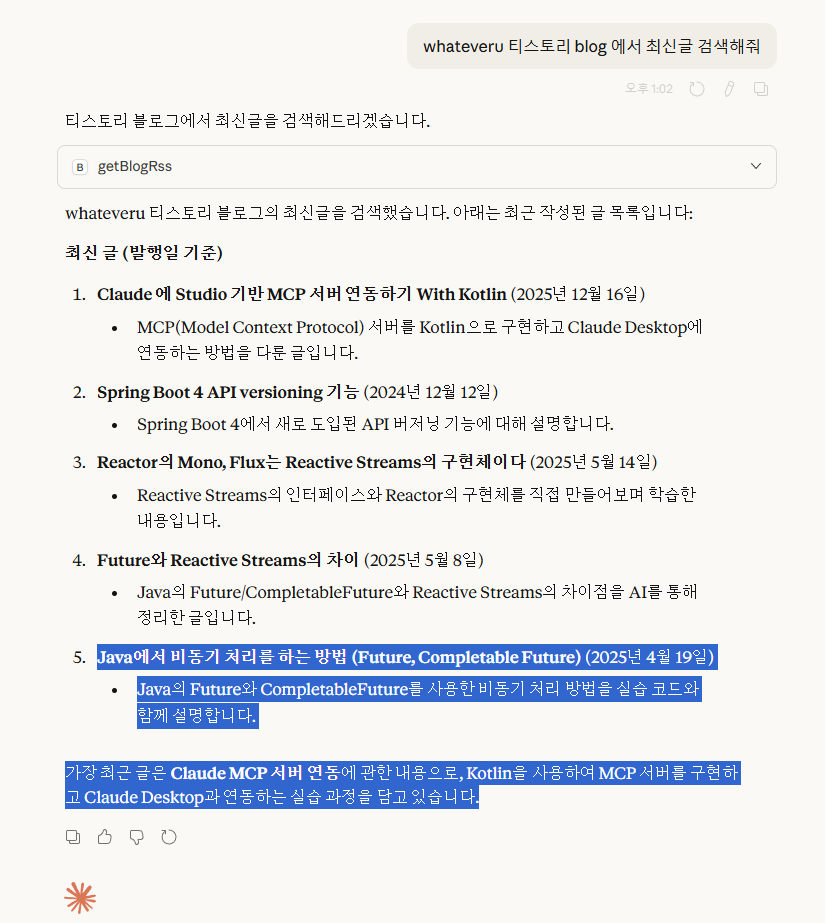
https://whateveru.tistory.com/21 여기에서 Stdio 방식으로 Json-Rcp 를 이용해서 로컬 Mcp 를 연동해보았음. 이번에는 Spring Ai 를 이용하여 블로그의 rss 를 읽어와서 최신글을 불러오는 Mcp 를 만들어 보자
요약
동영상 서비스가 종료되어 해당 콘텐츠를 재생할 수 없습니다.
Spring 관련 코드(일부)
Spring Ai 를 사용하면 아래처럼 간단하게 Mcp 툴을 설정할 수 있다
- SimpleMcpTool.kt
package whatever.study.ai.tool

import org.springaicommunity.mcp.annotation.McpTool
import org.springframework.context.annotation.Bean
import org.springframework.context.annotation.Configuration
import org.springframework.http.HttpHeaders
import org.springframework.http.MediaType
import org.springframework.http.ResponseEntity
import org.springframework.stereotype.Service
import org.springframework.web.reactive.function.client.WebClient

@Service
class SimpleMcpTool(
    private val webClient: WebClient
) {

    @McpTool(description = "whateveru tistory(티스토리) blog rss(피드) 검색")
    fun getBlogRss(): String {
        return webClient.get()
            .uri("https://whateveru.tistory.com/rss")
            .accept(
                MediaType.APPLICATION_XML,
                MediaType.TEXT_XML,
                MediaType("application", "rss+xml"),
                MediaType.ALL
            )
            .retrieve()
            .toEntity(String::class.java)
            .block()
            .toMcpJson()
    }
}

fun ResponseEntity<String>?.toMcpJson(): String {
    if (this == null) {
        return """{"error":"no_response"}"""
    }

    if (!this.statusCode.is2xxSuccessful) {
        return """{"error":"http_error","status":${this.statusCode.value()}}"""
    }

    val body = this.body
    if (body.isNullOrBlank()) {
        return """{"error":"empty_body"}"""
    }

    return body
}

@Configuration
class WebClientConfiguration {

    @Bean
    fun webClient(builder: WebClient.Builder): WebClient {
        return builder
            .defaultHeader(HttpHeaders.ACCEPT, MediaType.APPLICATION_JSON_VALUE)
            .build()
    }
}
- application.properties
spring.application.name=spring-ai
spring.ai.mcp.server.protocol=streamable
- build.gradle.kts
plugins {
    kotlin("jvm") version "1.9.25"
    kotlin("plugin.spring") version "1.9.25"
    id("org.springframework.boot") version "3.5.10-SNAPSHOT"
    id("io.spring.dependency-management") version "1.1.7"
}

group = "whatever.study.ai"
version = "0.0.1-SNAPSHOT"
description = "spring-ai"

java {
    toolchain {
        languageVersion = JavaLanguageVersion.of(17)
    }
}

repositories {
    mavenCentral()
    maven { url = uri("https://repo.spring.io/snapshot") }
}

dependencies {
    implementation("org.springframework.boot:spring-boot-starter-web")
    implementation("org.springframework.ai:spring-ai-starter-mcp-server-webmvc:1.1.2")
    implementation("org.springframework.boot:spring-boot-starter-webflux")

    implementation("org.jetbrains.kotlin:kotlin-reflect")
    testImplementation("org.springframework.boot:spring-boot-starter-test")
    testImplementation("org.jetbrains.kotlin:kotlin-test-junit5")
    testRuntimeOnly("org.junit.platform:junit-platform-launcher")
}

kotlin {
    compilerOptions {
        freeCompilerArgs.addAll("-Xjsr305=strict")
    }
}

tasks.withType<Test> {
    useJUnitPlatform()
}
Claude Desktop 연동
local 환경에서 claude desktop 에 연동하기 위해 설정을 추가한다.
아래 부분에서 blog-local 이다.
{
  "mcpServers": {
    "weather": {
      "command": "java",
      "args": [
        "-jar",
        "D:\\dev\\study\\whateveru\\ai-mcp-study\\build\\libs\\ai-mcp-study-1.0-SNAPSHOT.jar"
      ]
    },
    "blog-local": {
      "command": "npx",
      "args": [
        "-y",
        "@pyroprompts/mcp-stdio-to-streamable-http-adapter"
      ],
      "env": {
        "URI": "http://localhost:8080/mcp",
        "MCP_NAME": "blog-local"
      }
    }
  }
}
작업 Repository
https://github.com/ChoiSangIl/whateveru/tree/main/spring-ai
whateveru/spring-ai at main · ChoiSangIl/whateveru
테스트, 공부 해보고 싶은 것들. Contribute to ChoiSangIl/whateveru development by creating an account on GitHub.
github.com
결론
이것도 구동되는 환경, 방식만 다를 뿐 엔트로픽에서 만든 sdk 를 기반으로 동작 한다.
하지만 스프링의 특징을 살린 부분도 있고 스프링을 조금 다룰줄 아는 사람이면 접근성이 더 좋을 것 같다.
참고로 https://docs.spring.io/spring-ai/reference/api/mcp/mcp-security.html Security > Oauth 인증 등도 스팩에 있는 것 같은데 Wip로 되어있는걸로 봐서는 완성된 것은 아닌걸로 보인다.
참고 문서
https://spring.io/projects/spring-ai
https://docs.spring.io/spring-ai/reference/api/mcp/mcp-overview.html
'개발 > Gen Ai' 카테고리의 다른 글
| 최소한의 인공지능 구조 원리 파악 > 빅데이터란 (1) | 2026.01.27 |
|---|---|
| claude code > AI 기반 애자일 프레임워크 BMAD-METHOD (1) | 2026.01.23 |
| Spring AI > 로컬 환경에서 Ollama를 이용하여 LLM 연동하기 (0) | 2026.01.20 |
| Claude 에 Stido 기반 Mcp 서버 연동하기 With Kotlin (0) | 2025.12.16 |