
목적
로컬 데스크탑 환경에서 Ollama 를 통해 Qwen LLM 모델을 연동해 보자.
인터넷이 연결되어 있지 않은 환경에서도 LLM 모델을 로컬환경에서 돌려볼 수 있다.
Ollama 란?
- 모델 다운로드 관리자
ollama pull qwen3-vl:8b ollama ps - 로컬 환경에서 LLM 실행을 담당하는 엔진 역할
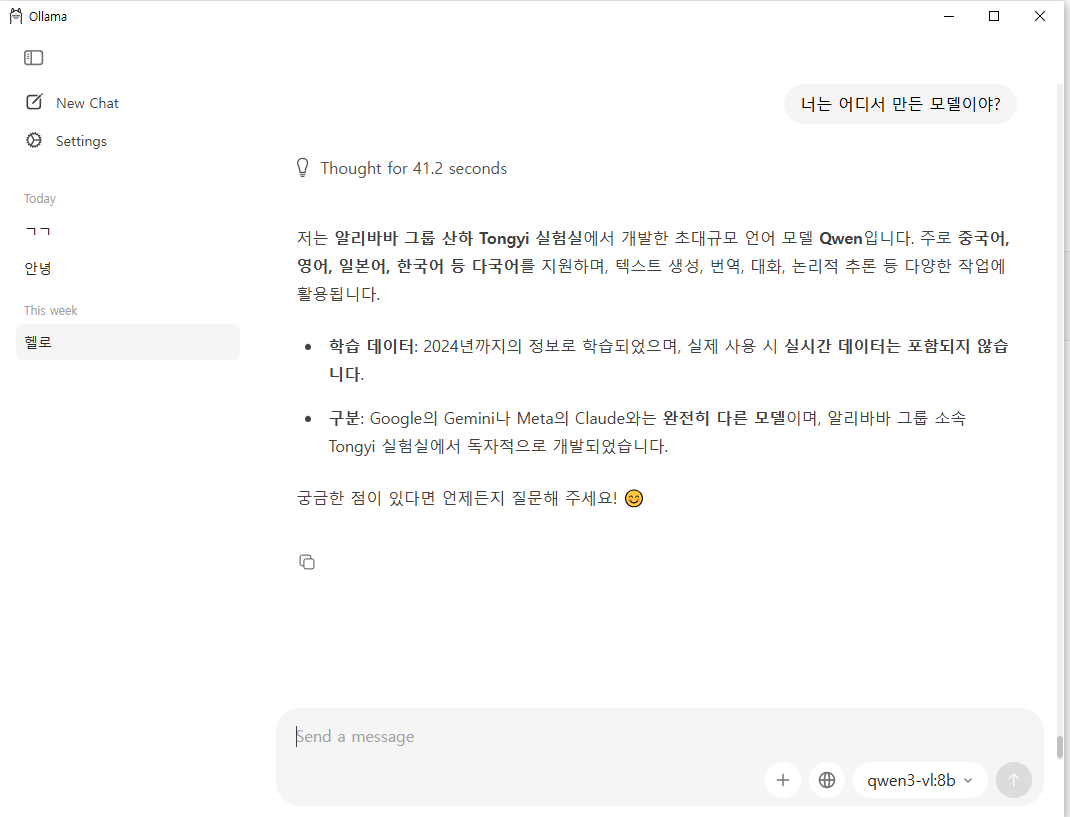
- LLM을 API 서버로 띄움
curl http://localhost:11434/api/generate \
  -d '{"model":"qwen3-vl:8b","prompt":"안녕"}'
Ollama 설치
Download Ollama on macOS
Download Ollama for macOS
ollama.com
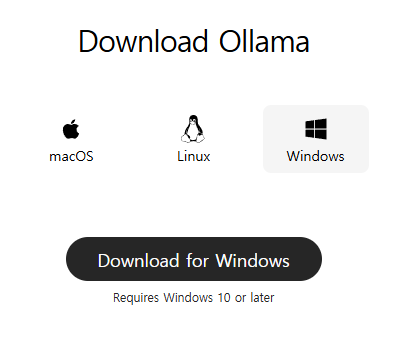
각 환경에 맞는 설치 파일을 다운로드 받아서 진행하면 된다.
LLM 모델 다운로드
llama4:16x17b 모델의 경우 67GB 이다.
16은 16개의 전문가 17b 는 17 Billion
17B = 17 × 1,000,000,000 = 17,000,000,000 (170억) 개의 파라미터를 가진 모델이란 뜻이다.
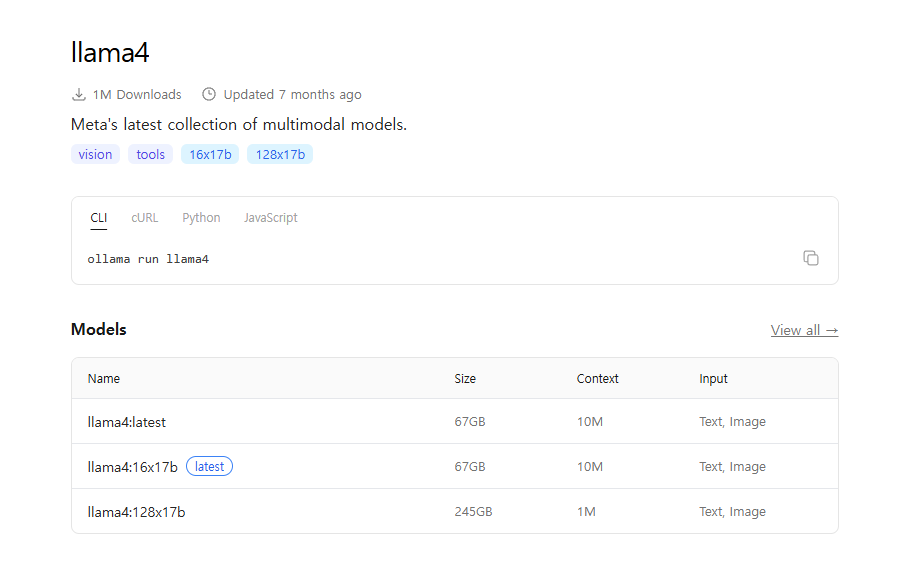
아무 생각없이 해당 모델로 시도해보려고 했다가 아래와 같은 오류를 만났다.
qwen3-vl:8b 모델의 경우 멀티 모달에 대한 처리가 가능하며 (이미지 + 텍스트) 이미지에서 특정 요소를 인식하거나 텍스트 등을 추출 할 수 있다. 또한 영상도 이해가 가능하며 코드를 생성하는 기능까지 포함하고 있는 모델이다. 자세한건 해당 문서를 보면 알 수 있다.
현재 우리나라에서 진행하고 있는 한국식 소버린 AI 콘테스트?를 보면 결국 해당 모델들을 만드는 작업이지 않을까 싶다

Spring Ai Local LLM API 연동
build.gradle.kt
plugins {
    kotlin("jvm") version "1.9.25"
    kotlin("plugin.spring") version "1.9.25"
    id("org.springframework.boot") version "3.5.10-SNAPSHOT"
    id("io.spring.dependency-management") version "1.1.7"
}

group = "whatever.study.ai"
version = "0.0.1-SNAPSHOT"
description = "spring-ai"

java {
    toolchain {
        languageVersion = JavaLanguageVersion.of(17)
    }
}

repositories {
    mavenCentral()
    maven { url = uri("https://repo.spring.io/milestone") }
    maven { url = uri("https://repo.spring.io/snapshot") }
}

dependencies {
    implementation("org.springframework.boot:spring-boot-starter-web")
    implementation(platform("org.springframework.ai:spring-ai-bom:1.1.2"))
    implementation("org.springframework.ai:spring-ai-starter-mcp-server-webmvc")
    implementation("org.springframework.ai:spring-ai-starter-model-ollama")
    implementation("org.springframework.boot:spring-boot-starter-webflux")

    implementation("org.jetbrains.kotlin:kotlin-reflect")
    testImplementation("org.springframework.boot:spring-boot-starter-test")
    testImplementation("org.jetbrains.kotlin:kotlin-test-junit5")
    testRuntimeOnly("org.junit.platform:junit-platform-launcher")
}

kotlin {
    compilerOptions {
        freeCompilerArgs.addAll("-Xjsr305=strict")
    }
}

tasks.withType<Test> {
    useJUnitPlatform()
}
application.properties
spring.application.name=spring-ai
spring.ai.mcp.server.protocol=streamable

spring.ai.ollama.base-url=http://localhost:11434
spring.ai.ollama.chat.options.model=qwen3-vl:8b
spring.ai.ollama.chat.options.temperature=0.7
Controller
일반 ChatGpt 와 비슷하게 스트리밍 방식과 일반 동기식 요청으로 구현.
package whatever.study.ai.chat

import org.springframework.ai.chat.messages.UserMessage
import org.springframework.ai.chat.model.ChatModel
import org.springframework.ai.chat.prompt.Prompt
import org.springframework.http.MediaType
import org.springframework.web.bind.annotation.*
import org.springframework.web.servlet.mvc.method.annotation.SseEmitter
import java.io.IOException

data class ChatRequest(val message: String)
data class ChatResponse(val answer: String)

@RestController
@RequestMapping("/api/chat")
class ChatController(
    private val chatModel: ChatModel
) {
    @PostMapping
    fun chat(@RequestBody req: ChatRequest): ChatResponse {
        val answer = chatModel.call(req.message)
        return ChatResponse(answer)
    }

    @PostMapping(
        "/stream",
        produces = [MediaType.TEXT_EVENT_STREAM_VALUE],
        consumes = [MediaType.APPLICATION_JSON_VALUE]
    )
    fun stream(@RequestBody req: ChatRequest): SseEmitter {
        val emitter = SseEmitter(0L)

        val prompt = Prompt(listOf(UserMessage(req.message)))

        val disposable = chatModel.stream(prompt)
            .mapNotNull { it.result.output.text }
            .filter { it?.isNotBlank() == true }
            .subscribe(
                { chunk ->
                    try {
                        chunk?.let {
                            emitter.send(
                                SseEmitter.event()
                                    .name("token")
                                    .data(chunk)
                            )
                        }
                    } catch (e: IOException) {
                        emitter.completeWithError(e)
                    }
                },
                { err ->
                    try {
                        emitter.send(
                            SseEmitter.event()
                                .name("error")
                                .data(err.message ?: "unknown error")
                        )
                    } catch (_: Exception) {
                        // ignore
                    } finally {
                        emitter.completeWithError(err)
                    }
                },
                {
                    try {
                        emitter.send(
                            SseEmitter.event()
                                .name("done")
                                .data("[DONE]")
                        )
                    } catch (_: Exception) {
                        // ignore
                    } finally {
                        emitter.complete()
                    }
                }
            )

        emitter.onCompletion { disposable.dispose() }
        emitter.onTimeout {
            disposable.dispose()
            emitter.complete()
        }
        emitter.onError {
            disposable.dispose()
        }

        return emitter
    }
}
chat.html
<!doctype html>
<html lang="ko">
<head>
    <meta charset="utf-8" />
    <meta name="viewport" content="width=device-width, initial-scale=1" />
    <title>Ollama(Qwen) Chat Test</title>
    <style>
        body { font-family: system-ui, -apple-system, Segoe UI, Roboto, sans-serif; margin:0; background:#0b0f19; color:#e6e8ee; }
        .wrap { max-width: 900px; margin:0 auto; padding:24px; }
        .card { background:#11182a; border:1px solid #223055; border-radius:16px; padding:16px; box-shadow:0 8px 30px rgba(0,0,0,.25); }
        textarea { width:100%; min-height:90px; resize:vertical; padding:12px; border-radius:12px; border:1px solid #2b3b66; background:#0c1222; color:#e6e8ee; }
        button { padding:10px 14px; border-radius:12px; border:1px solid #2b3b66; background:#182446; color:#e6e8ee; cursor:pointer; }
        button:disabled { opacity:.6; cursor:not-allowed; }
        pre { white-space: pre-wrap; word-break: break-word; margin:0; font-family: ui-monospace, SFMono-Regular, Menlo, Monaco, Consolas, monospace; font-size:13px; line-height:1.5; }
        .row { display:flex; gap:12px; flex-wrap:wrap; margin-top:12px; }
        .hint { color:#aab3c7; font-size:12px; margin-top:10px; }
        .error { color:#ffb4b4; }
        code { background:#0c1222; padding:2px 6px; border-radius:8px; border:1px solid #2b3b66; }
    </style>
</head>
<body>
<div class="wrap">
    <h2 style="margin:0 0 14px 0;">Ollama(Qwen) Chat Test</h2>

    <div class="card" style="margin-bottom:14px;">
        <label for="msg" style="display:block; margin-bottom:8px;">질문</label>
        <textarea id="msg" placeholder="예) 한국어로 자연스럽게 대답해줘. Spring AI에서 Ollama 쓰는 법 알려줘"></textarea>

        <div class="row">
            <button id="btnOnce">일반 요청</button>
            <button id="btnStream">스트리밍 요청(SSE)</button>
            <button id="btnStop" disabled>스트리밍 중단</button>
            <button id="btnClear" type="button">지우기</button>
        </div>

        <div class="hint">
            엔드포인트: <code>POST /api/chat</code>, <code>POST /api/chat/stream</code>
            <span id="status" style="margin-left:10px;"></span>
        </div>
    </div>

    <div class="card">
        <div style="display:flex; justify-content:space-between; align-items:center; gap:12px; margin-bottom:10px;">
            <strong>답변</strong>
            <span class="hint">SSE는 <code>data:</code> 라인만 파싱해서 실시간으로 붙입니다.</span>
        </div>
        <pre id="out">답변이 여기에 표시됩니다.</pre>
        <div id="err" class="hint error" style="margin-top:10px;"></div>
    </div>
</div>

<script>
    const $ = (s) => document.querySelector(s);

    const out = $("#out");
    const err = $("#err");
    const status = $("#status");
    const msg = $("#msg");

    const btnOnce = $("#btnOnce");
    const btnStream = $("#btnStream");
    const btnStop = $("#btnStop");
    const btnClear = $("#btnClear");

    let abortController = null;

    function setBusy(busy) {
        btnOnce.disabled = busy;
        btnStream.disabled = busy;
        btnStop.disabled = !busy;
        status.textContent = busy ? "요청 중..." : "";
    }
    function setOutput(text) { out.textContent = text || ""; }
    function setError(text) { err.textContent = text || ""; }

    btnClear.addEventListener("click", () => {
        msg.value = "";
        setOutput("답변이 여기에 표시됩니다.");
        setError("");
    });

    btnStop.addEventListener("click", () => {
        if (abortController) abortController.abort();
    });

    // 일반 요청: POST /api/chat  { message } -> { answer }
    btnOnce.addEventListener("click", async () => {
        setError("");
        setOutput("");
        const message = msg.value.trim();
        if (!message) return setError("질문을 입력해 주세요.");

        try {
            setBusy(true);
            const res = await fetch("/api/chat", {
                method: "POST",
                headers: { "Content-Type": "application/json" },
                body: JSON.stringify({ message })
            });

            const ct = res.headers.get("content-type") || "";
            if (!res.ok) {
                const body = await res.text().catch(() => "");
                throw new Error(`HTTP ${res.status} ${res.statusText}\n${body}`);
            }

            if (ct.includes("application/json")) {
                const data = await res.json();
                setOutput(data.answer ?? JSON.stringify(data, null, 2));
            } else {
                setOutput(await res.text());
            }
        } catch (e) {
            setError(String(e));
        } finally {
            setBusy(false);
        }
    });

    // 스트리밍 요청: POST /api/chat/stream (TEXT_EVENT_STREAM)
    // SSE는 "data: ...\n\n" 형태라 data 라인만 파싱해서 붙임
    btnStream.addEventListener("click", async () => {
        setError("");
        setOutput("");
        const message = msg.value.trim();
        if (!message) return setError("질문을 입력해 주세요.");

        abortController = new AbortController();

        try {
            setBusy(true);

            const res = await fetch("/api/chat/stream", {
                method: "POST",
                headers: { "Content-Type": "application/json" },
                body: JSON.stringify({ message }),
                signal: abortController.signal
            });

            if (!res.ok) {
                const body = await res.text().catch(() => "");
                throw new Error(`HTTP ${res.status} ${res.statusText}\n${body}`);
            }
            if (!res.body) throw new Error("ReadableStream을 사용할 수 없습니다. 브라우저를 확인해 주세요.");

            const reader = res.body.getReader();
            const decoder = new TextDecoder("utf-8");

            let buffer = "";
            let assembled = "";

            while (true) {
                const { done, value } = await reader.read();
                if (done) break;

                buffer += decoder.decode(value, { stream: true });

                // 이벤트 구분은 \n\n
                const events = buffer.split("\n\n");
                buffer = events.pop() ?? "";

                for (const evt of events) {
                    const dataLines = evt
                        .split("\n")
                        .filter(line => line.startsWith("data:"))
                        .map(line => line.replace(/^data:\s?/, ""));

                    if (dataLines.length === 0) continue;

                    assembled += dataLines.join("\n");
                    setOutput(assembled);
                }
            }

            // SSE가 아닌 일반 텍스트 스트림이면 남은 버퍼 표시
            if (!assembled && buffer.trim()) setOutput(buffer);

        } catch (e) {
            if (String(e).includes("AbortError")) {
                setError("스트리밍을 중단했습니다.");
            } else {
                setError(String(e));
            }
        } finally {
            abortController = null;
            setBusy(false);
        }
    });
</script>
</body>
</html>
LLM 호출 테스트
대략 1분정도 소요됨..ㅎㅎㅎ (1분부터 보세요)
동영상 서비스가 종료되어 해당 콘텐츠를 재생할 수 없습니다.

결론
인터넷 없이도 쓸만한 LLM을 로컬환경에서 돌릴 수 있다.
ChatGPT, Claude, Gemini 같은 서비스도 결국 LLM + 주변 시스템의 조합이지 않을까란 생각이 들었다.
LLM 모델 생성 방식이나 동작 과정등도 공부하면 좋을 것 같다.
참고문서
spring ai > ollama 연동 문서 https://docs.spring.io/spring-ai/reference/api/chat/ollama-chat.html
Ollama Chat :: Spring AI Reference
Ollama supports thinking mode for reasoning models that can emit their internal reasoning process before providing a final answer. This feature is available for models like Qwen3, DeepSeek-v3.1, DeepSeek R1, and GPT-OSS. Thinking mode helps you understand
docs.spring.io
ollama > open model download https://ollama.com/download/windows
Download Ollama on Windows
Download Ollama for Windows
ollama.com
'개발 > Gen Ai' 카테고리의 다른 글
| 최소한의 인공지능 구조 원리 파악 > 빅데이터란 (1) | 2026.01.27 |
|---|---|
| claude code > AI 기반 애자일 프레임워크 BMAD-METHOD (1) | 2026.01.23 |
| Spring Ai Mcp Claude 연동 With Kotlin (1) | 2026.01.10 |
| Claude 에 Stido 기반 Mcp 서버 연동하기 With Kotlin (0) | 2025.12.16 |